
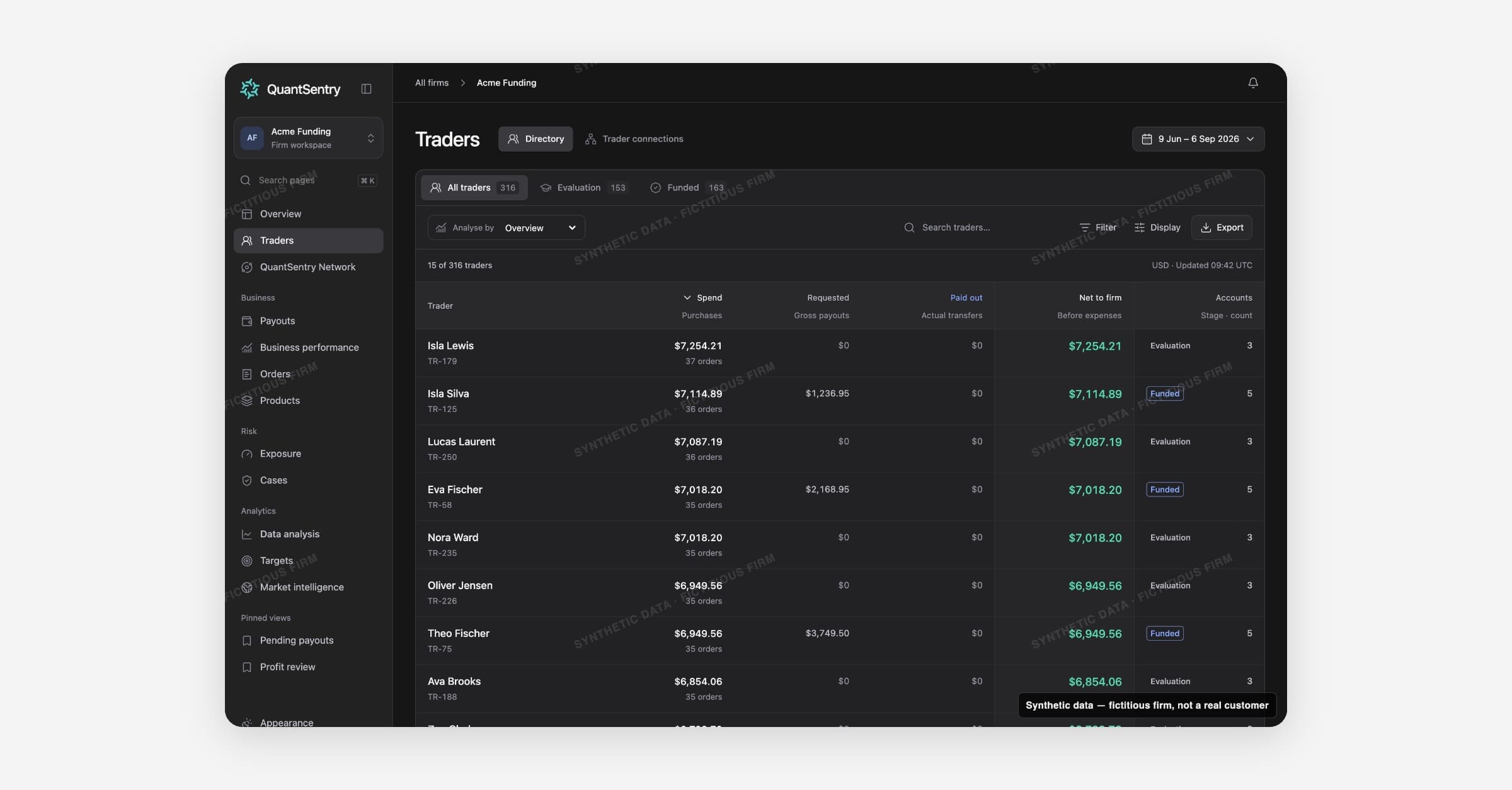
Traders is the single directory of every person the firm knows, whether they are still in evaluation or already funded. A row on this page is a person, not a trading account: it joins their purchases, evaluation and funded accounts, payout requests, recorded identifiers and any open Cases into one place.
The directory
The directory table lists every known trader, with lifecycle tabs for All traders, Evaluation and Funded. Financial columns follow the period picker in the toolbar, but the list of people itself does not: everyone stays listed regardless of the selected date range.
The Analyse by selector re-projects the table's columns for four different questions:
Analysis | What it shows |
|---|---|
Overview | Spend, requested payouts, paid out, net to firm, accounts |
By spend | Orders, spend, paid out, net to firm, accounts |
By payouts | Spend, requested, pending payouts, paid out, payout multiple, accounts |
Recorded DNA | Distinct identifiers by family (addresses, phones, payment customers, emails, checkout IPs, account logins), plus connected people |
Use Search traders to match a name, person ID, account ID or any recorded identifier value. The Filter menu narrows the list to funded traders, traders in evaluation, traders with open Cases, or traders with recorded connections. Export sends the current columns and filtered rows to CSV.
The trader profile
Selecting a trader opens their profile, which carries a title block (name, person ID, account count, Case count and a KYC badge) and seven tabs.
Tab | What it covers |
|---|---|
Overview | Trader DNA graph, network summary and the trader's Cases |
Cases | Every Case involving this trader, open and closed |
Accounts | Evaluation and funded accounts, with balance, accrued liability and period return |
Payouts | Pending payout requests for this trader, oldest first |
DNA & evidence | The full Trader DNA graph plus the trading and verification evidence behind each connection |
Network | Cross-firm signals for this trader from QuantSentry Network |
Activity | A timeline of notes, assignments and status changes across this trader's Cases |
A right-hand properties panel repeats on every tab except Network: identity details, KYC status, review tags, accrued liability and pending requested amounts.
Trader DNA and connections inside your firm
The Trader DNA graph, on the Overview and DNA & evidence tabs, maps a trader's recorded identifiers (addresses, phones, emails, payment customers, checkout IPs, logins) and shows which other traders at your firm share them. Selecting a connection opens the shared identifiers and the matching basis behind it, for example that addresses are compared after case and spacing normalisation. Sharing an identifier is always shown as evidence, not a conclusion: the page states that sharing is context, not a fraud verdict.
The Trader connections tab, next to Directory at the top of the page, shows the same identifier and trading-behaviour evidence as a graph of every connected group of people at your firm, rather than one trader at a time. Selecting an edge opens the shared identifiers and any trading evidence behind that specific pair.
Both views cover connections within your own firm. Signals from other participating firms live on the separate QuantSentry Network page and the profile's Network tab.
How it connects
The trader profile's Cases tab and Open Cases column link to Cases. The Payouts tab lists this person's pending requests, which come from Payouts. The Network tab and the "Beyond your firm" strip pull in cross-firm signals from QuantSentry Network. Spend and order counts on the directory reflect the same data as Orders.