
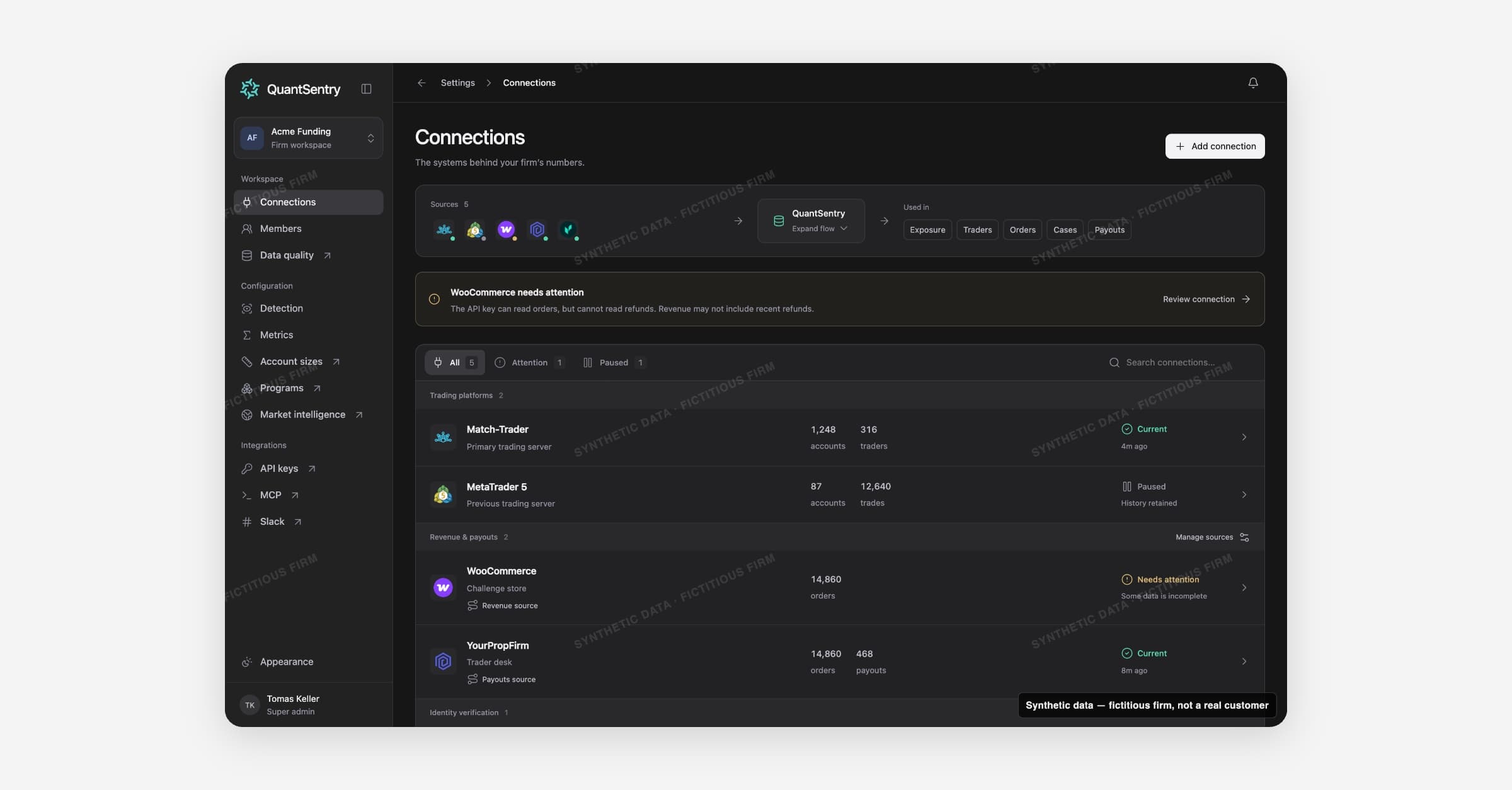
Connections is the Settings page listing every external system feeding a firm's data: trading platforms, commerce and payout sources, identity verification, acquisition spend, and market context. It shows whether each source is healthy and current, and which one is authoritative for each financial book.
The connector catalog
Connections are organized under the same categories as QuantSentry's connector catalog:
Category | Covers |
|---|---|
Trading platforms | Accounts, balances, positions, trades, and login evidence (MetaTrader 5 and 4, cTrader, DXtrade, TradeLocker, Match-Trader, ThinkTrader, Volumetrica, Rithmic, and others) |
Revenue & payouts | Orders, payments, refunds, payout requests, and paid amounts (WooCommerce, YourPropFirm, a firm's own Enrichment API, or a signed custom webhook) |
Identity verification | Signed KYC decisions and document-verification evidence (Veriff, Sumsub) |
Acquisition spend | Daily campaign spend for contribution and payback analysis (Google Ads, Meta Ads, LinkedIn Ads) |
Market context | External timing evidence used to explain trading around market events (the Forex Factory calendar) |
Adding a connection opens the catalog through Add connection: search or browse by category, then fill in a connection name and the provider's credential, OAuth, or webhook setup. A provider without a read-only ingestion path yet is listed but can't be configured.
Health, freshness, and the data-flow strip
Every connection carries a health badge: Current, Needs attention, Paused, or Awaiting first sync. A connection needs attention when one of its resources has an error or its last successful read is older than 48 hours, since a valid credential doesn't by itself guarantee every resource is still syncing. Pausing a connection stops new collection but keeps every stored record and its sync history available in reports.
A data-flow strip at the top of the page traces this end to end: sources on the left, the data types they supply (accounts, trades, traders, orders, payouts, verifications) in the middle, and the destinations that consume them (Orders, Payouts, Traders, Cases, Exposure) on the right. Selecting any node highlights its data forward and backward through the graph.
One elected source per financial book
Accounts, trades, traders, and verifications are composed: every connection that supplies them contributes its records together. Orders and payouts work differently, they are elected: exactly one connection feeds each of those financial books at a time, so a firm running the same book through two systems (for example, orders in both a store and a trader-desk platform) doesn't double count revenue. Other stored copies stay retained and visible, just excluded from reports. The Manage sources dialog is where an admin chooses, per book, which connection is the elected source.
How it connects
Data quality covers freshness and coverage in more depth and links back to the connection responsible for a gap. The elected Orders source feeds revenue figures on Business performance, and everything collected here flows into Traders, Cases, and Exposure. Members roles decide who can manage connections, Detection consumes the trades, logins, and calendar events supplied here, and Metrics draws on the same connected records for its record-based measurements.