
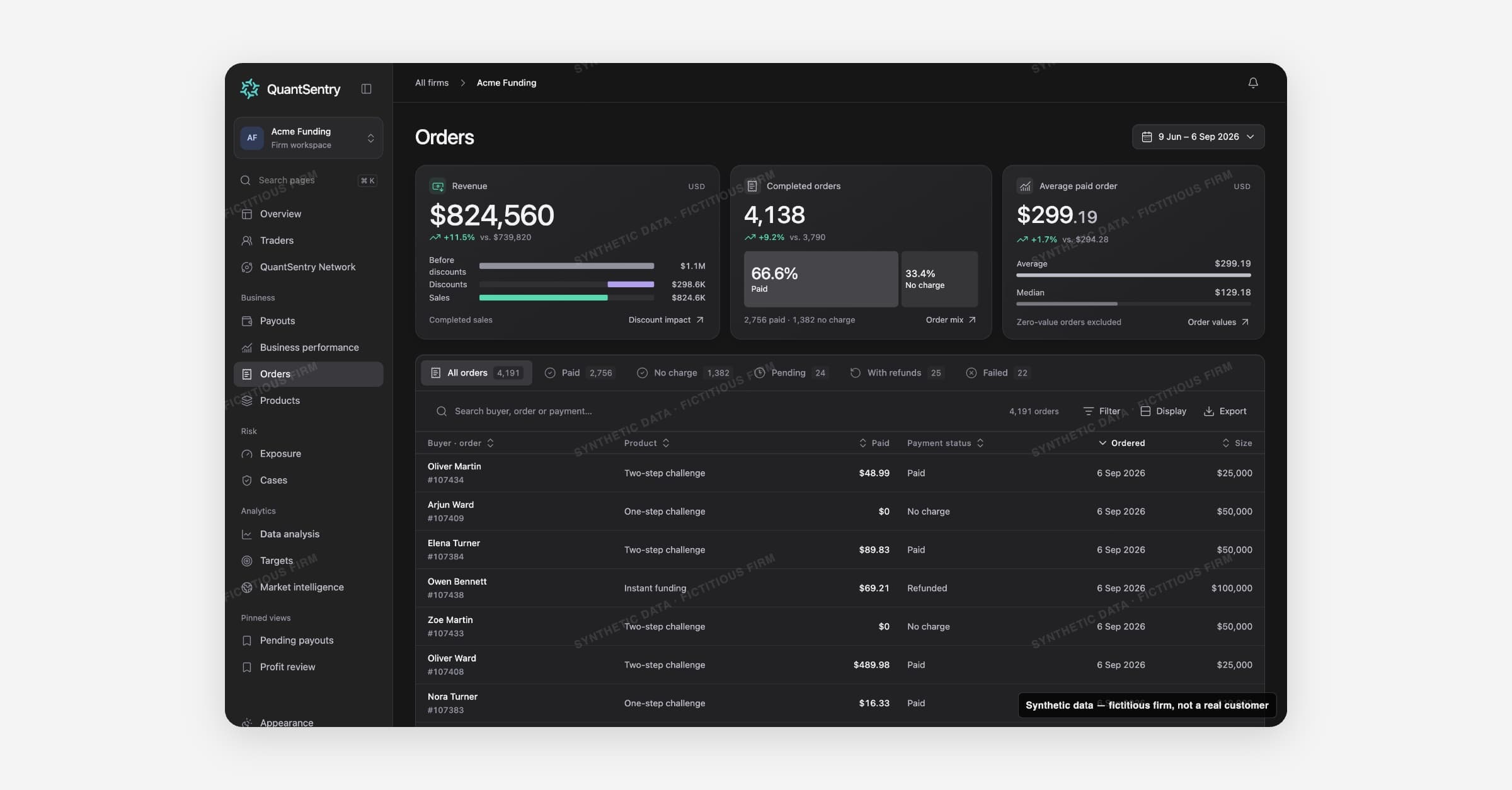
Orders is the firm's order book: every product order recorded from commerce sources, whether it settled or not. It answers what was sold, to whom, and how much of it is verified revenue.
What you can do here
Read verified sales for the period from the KPI strip, separate from pending, failed or refunded orders.
Look up a specific order by buyer, order number or payment reference, and see whether it was paid, refunded, or created an account.
Filter or search the book by product, account size, country, trader status, payment status and payment method.
Save a combination of search, tab and filters as a view you can reload later.
Export the exact rows you're viewing as CSV.
Open an order to see its receipt, its source events, and the checkout identifiers recorded at purchase, including whether those identifiers are shared with another person.
KPI strip
Three cards summarise completed order sales for the period, each comparing to the prior period when both windows have a complete book:
Card | What it shows |
|---|---|
Revenue | Completed order totals after discounts. Refunded, failed and pending orders are excluded. |
Completed orders | Count of paid orders plus no-charge orders, shown separately. |
Average paid order | Revenue divided by the count of paid orders. Zero-value orders are excluded from this figure; a zero-value order does not by itself prove a discount was used. |
Each card can expand into a per-interval history (daily, 7-day, monthly or quarterly totals). The KPIs recompute against whatever the current search, status tab and filters return, not the whole book.
The order table
Status tabs, All orders, Paid, No charge, Pending, With refunds, Failed, each carry a count that respects the current search and filters but not the tab itself. Paid includes orders that were later partially refunded; With refunds matches any order carrying a refund amount above zero, full or partial.
The table itself:
Column | What it shows |
|---|---|
Buyer / order | Buyer name (or an "unattributed buyer" placeholder) with the order number |
Product | Product name |
Paid | Amount received |
Payment status | Status label |
Ordered | Order date |
Size | Account size |
Rows link to the order record. Use Filter to combine up to eleven fields (product, order month, account size, country, city, trader, first seen, trader status, status, paid with, currency), Display to switch row density, and Export to download the filtered rows.
The order record
Opening an order shows its receipt (amount, subtotal, discount and coupon code where one applied, total, paid and refunded amounts), a timeline of the order's source events (placed, payment received, refund recorded, pending or failed), and the identifiers recorded at checkout, excluding name and email. A link opens the buyer's Trader DNA evidence, and a shared-identifiers list surfaces other people who share one of those identifiers, with a note that this is evidence to review, not a fraud verdict. A side panel links to the buyer, the trading account the order created, the payment method and reference, and the source connection.
How it connects
Traders hold the buyer identity and any peer links surfaced through shared checkout identifiers. Products links back from each order's product, and pulls its own revenue figures from the same completed orders. Business performance links to Orders from its Revenue measure. Connections shows which source and connection supplied a given order.