
QuantSentry changelog
Registro modifiche
Le ultime release e i miglioramenti di QuantSentry.
Continuando, accetti i nostri Termini e Informativa sulla privacy.
A prop firm risk management dashboard for payouts and case triage
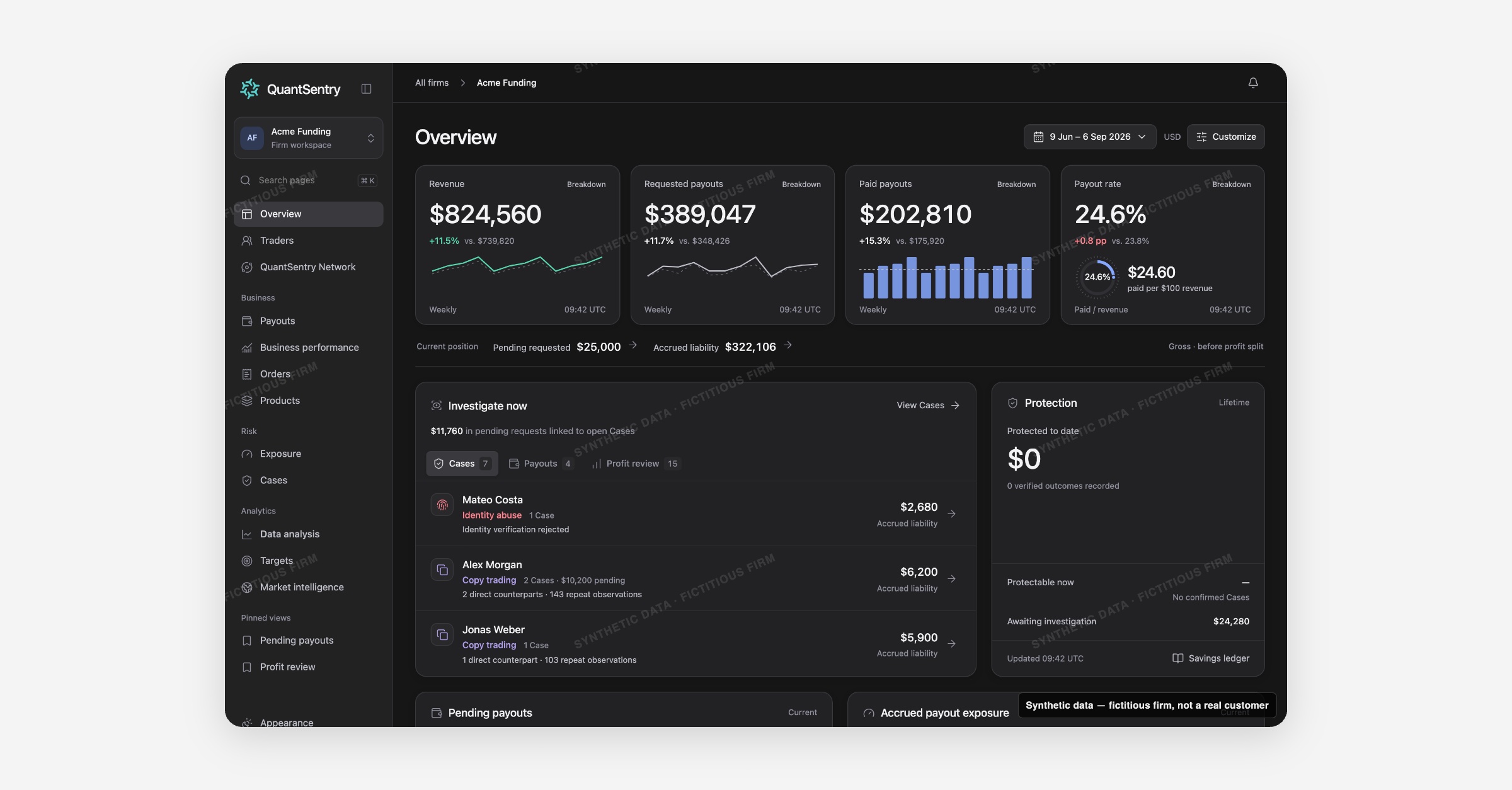
QuantSentry's Overview page puts revenue, requested and paid payouts, payout rate, accrued liability and open Cases on one home screen, so prop firm owners and risk teams see what needs review today without pulling reports from separate systems.
Screenshot uses synthetic example data from a fictional firm ("Acme Funding"). No real customer or trader data is shown.
What's new
Overview is now previewable in the QuantSentry workspace as the signed-in home page for a firm.
A headline strip tracks four metrics at a time (by default Revenue, Requested payouts, Paid payouts and Payout rate), a Current position band shows pending requested amounts and accrued liability, and an "Investigate now" panel ranks traders with open Cases, pending payout requests linked to a Case, and funded accounts above the 4% profit review threshold.
A Protection panel tracks verified savings recorded in the Savings Ledger.
Owners can choose their own four headline measures and panel order and save the result as a pinned view.
Why it matters
Without one screen, a firm's daily position gets assembled by hand from the trading platform's back office, commerce reports and spreadsheets, and the request that matters most, a large payout from a trader already under investigation, is easy to miss.
Overview is built for prop firm risk management: requested and paid payouts are always kept separate, current-position figures are labeled "gross, before profit split," and potential exposure is never counted as savings.
That gives owners and payout reviewers one honest number to work from before a funded trader payout review turns into an approval.
What you can do with it
Track Revenue, Requested payouts, Paid payouts and Payout rate, each with a period-over-period change and a trend chart.
Open Investigate now to triage across Cases, Payouts (pending requests linked to an open Case), and Profit review (accounts above the 4% threshold with no Case yet).
Check Current position: pending requested amount and accrued liability, one click from Payouts or Exposure.
Review Protected to date and the underlying verified outcomes in the Savings Ledger.
See the Accrued payout exposure histogram of funded accounts by profit-to-balance band.
Choose your own four headline measures and panel order, then Save & pin the view.
How it fits with the rest of QuantSentry
Overview's Investigate now panel routes into Cases and Payouts, the Current position band links to Exposure, and the Product performance panel opens into Products and Business performance.
Trader behavior analytics: one profile for every account, purchase and payout
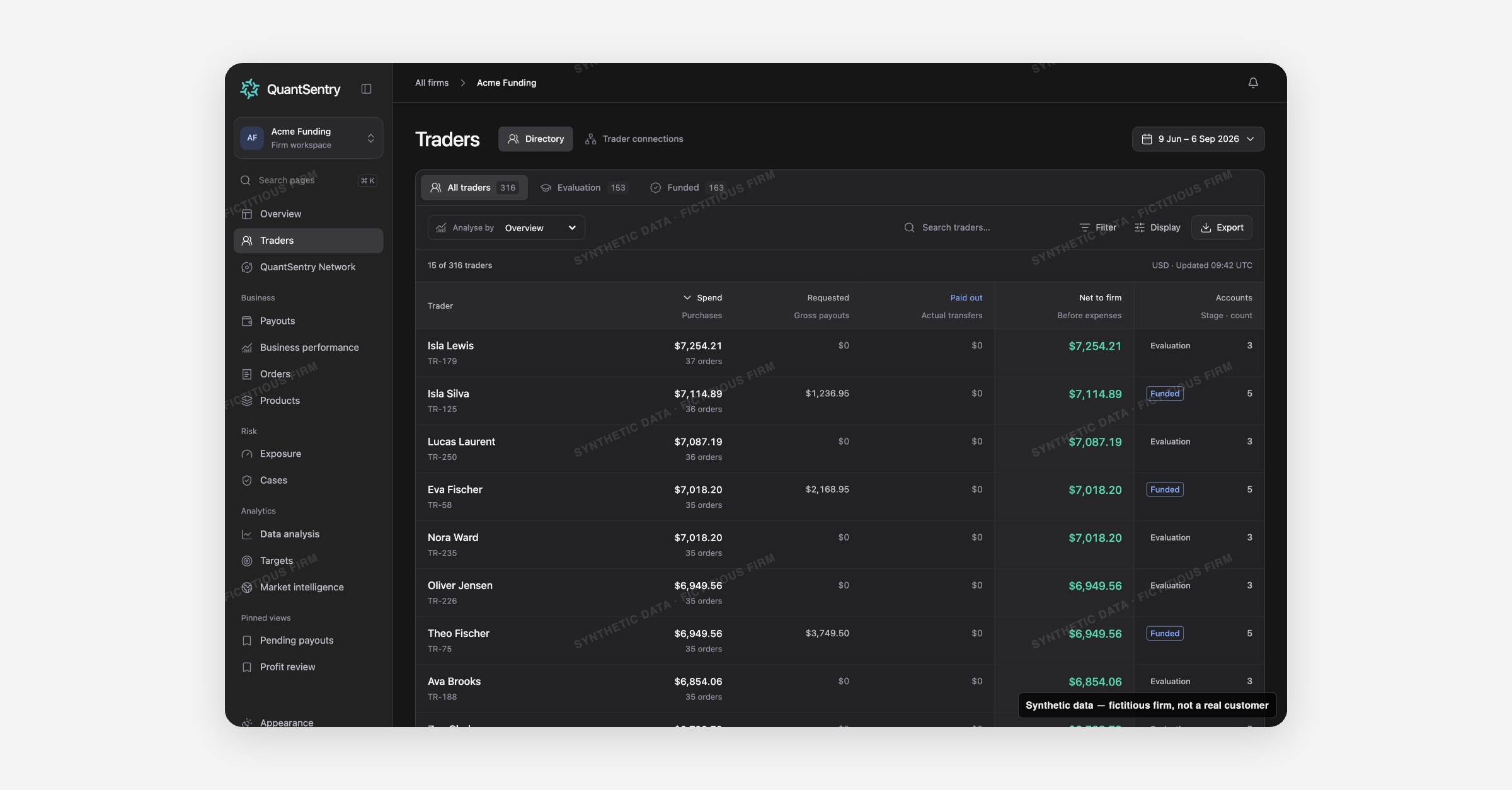
QuantSentry's Traders directory joins each person's purchases, evaluation and funded accounts, payout requests and recorded identifiers into a single profile, giving prop firms one source to analyze trader behavior instead of three disconnected systems.
Screenshot uses synthetic example data from a fictional firm ("Acme Funding"). No real customer or trader data is shown.
What's new
Traders is now previewable in the QuantSentry workspace as the single directory of every person the firm knows, whether they hold one evaluation account or five funded accounts across different platforms.
Instead of separate screens for purchases, payout requests and trading accounts, one row per person rolls all of it up, and an Analyse by selector re-projects the same table into four views: Overview, By spend, By payouts, and Recorded DNA.
Opening a trader opens a full profile with Overview, Cases, Accounts, Payouts, DNA & evidence, Network and Activity tabs.
Why it matters
When revenue sits in the commerce platform, payouts in a separate ledger and accounts across several trading platforms, the same person can look like several unrelated records, and multi-accounting or copy-trading rings hide in the gaps between systems.
Traders is built for trader behavior analytics: every figure is per person, not per account, so spend, requested payouts, paid out and net-to-firm roll up honestly, and shared identifiers such as address, phone, payment customer or checkout IP surface as evidence, never as an automatic fraud verdict.
That distinction matters for anyone doing a funded trader payout review who needs to know whether two accounts belong to one person before money goes out.
What you can do with it
Filter the directory by lifecycle: All traders, Evaluation, or Funded.
Switch Analyse by to see Spend, Requested, Paid out, Net to firm, Payout multiple, or Recorded DNA.
Search by name, person ID, account ID, or any recorded identifier value.
Open a trader's Trader DNA graph to see shared identifiers and connected people, each with its own written matching basis.
Check the Cases, Accounts and Payouts tabs on a profile for that person's full history in one place.
Export the current filtered view as a CSV for offline review.
How it fits with the rest of QuantSentry
A trader profile links directly into Cases for that person's open investigations, Payouts for pending requests, and QuantSentry Network for cross-firm signals about the same person.
Cross-firm fraud signals for traders you already know
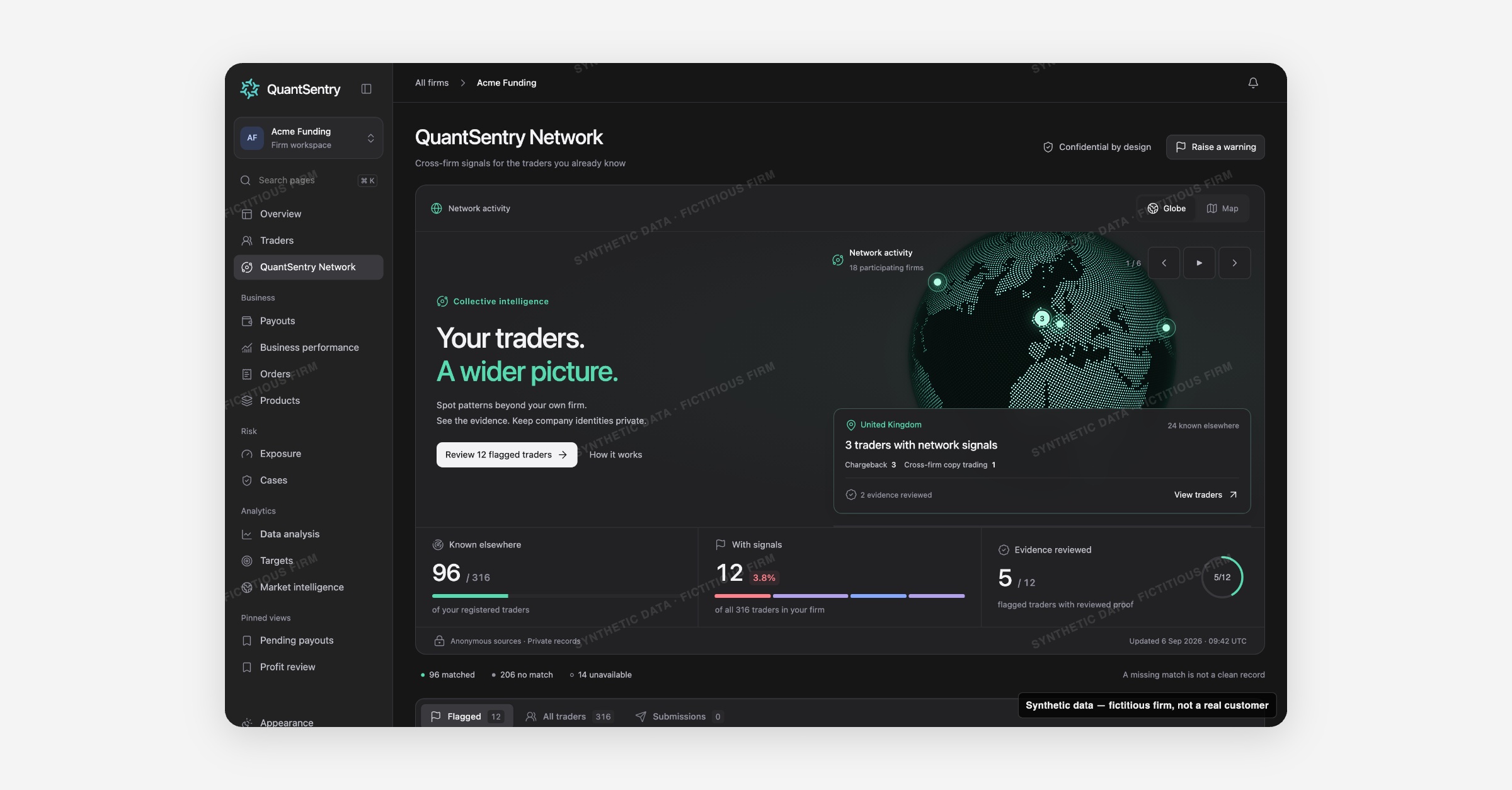
QuantSentry Network shows whether other participating prop firms have flagged a trader already in your directory, returning anonymous counts and evidence states instead of raw data, so signals from other firms surface before a payout goes out.
Screenshot uses synthetic example data from a fictional firm ("Acme Funding"). No real customer or trader data is shown.
What's new
QuantSentry Network is now previewable in the QuantSentry prototype workspace, built on synthetic firms ahead of a production rollout that stays gated until matching, privacy and serving requirements are validated.
For each person already in a firm's Traders directory, it shows whether other participating firms recognize the same person (matched on a normalized, hashed email, never by name), which signal categories exist (chargeback, cross-firm copy trading, identity verification, cross-firm hedging), and how strong the evidence is: Submitted, Corroborated, Detected, or Evidence reviewed.
A globe and map view group a firm's own matched traders by country, and a register lists flagged traders for review.
Why it matters
A trader who failed identity verification, charged back, or ran a copy-trading scheme at another firm can look completely clean at yours, because every firm currently sees only its own history, and fraud rings count on that gap.
QuantSentry Network is built to surface cross-firm fraud signals without exposing a firm's own traders or business data to competitors: only anonymous counts, categories, evidence states and dates come back, never another firm's name, contact details, accounts or case notes.
A missing match is labeled as exactly that, not treated as a clean record, which matters for prop firm risk management decisions made under time pressure.
What you can do with it
Check Known elsewhere, With signals, and Evidence reviewed counts across your whole trader base.
Explore signals by country on the interactive Globe or Map view.
Open a trader's network profile to see each signal's category, evidence state, and how many other firms are involved, without seeing which firms.
Attach a network snapshot to an open Case with Add context to a Case, without changing the Case's status or owner.
Raise a private warning about one of your own traders, or request a review of a match or signal you believe is wrong.
How it fits with the rest of QuantSentry
Every drill-down opens the firm's own Traders profile, never another firm's screen, and a flagged signal can be attached as context to an existing Cases investigation.
Funded trader payout review, from request to paid
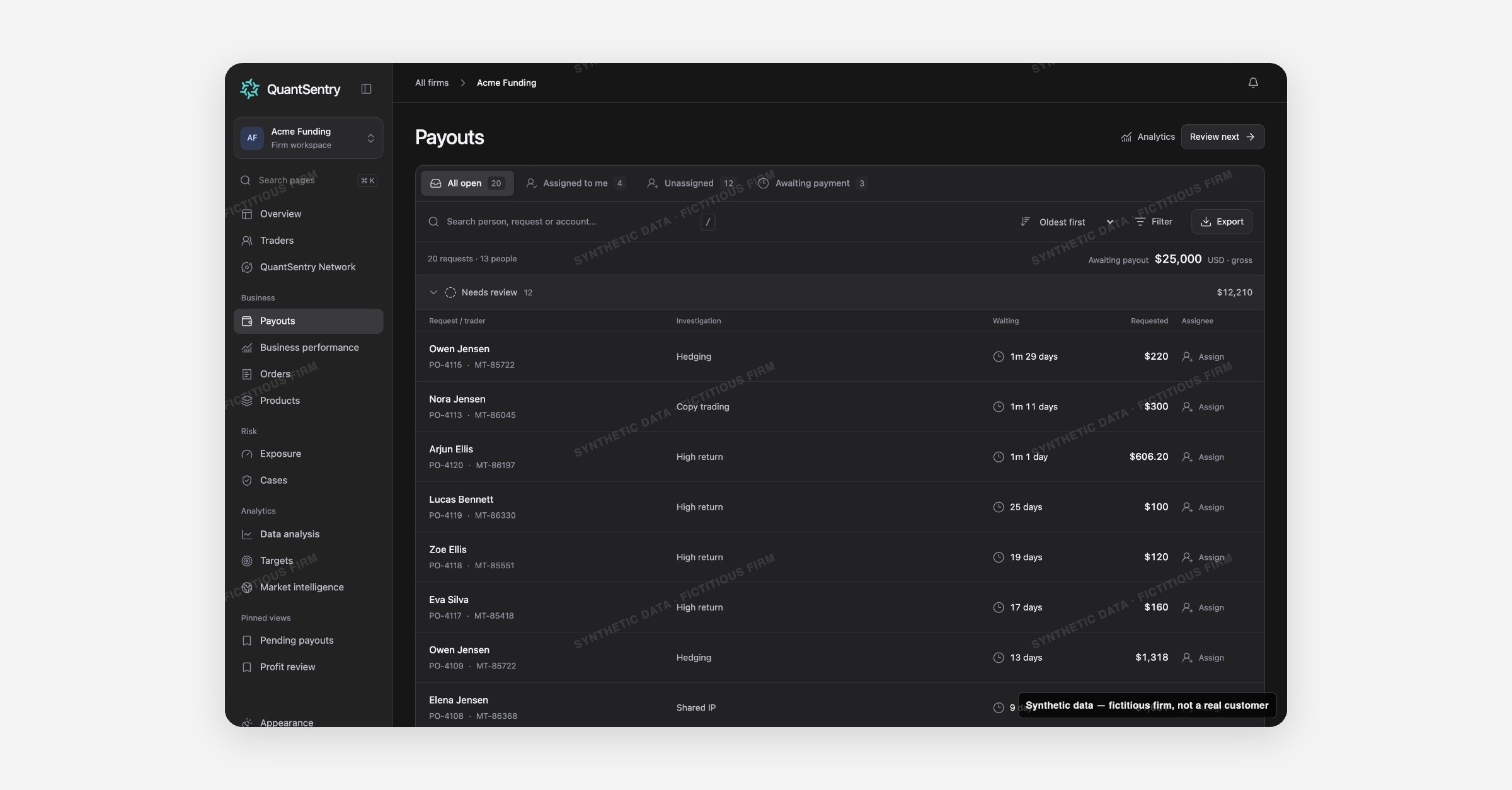
QuantSentry's Payouts page turns the payout back office into a review queue: every open request grouped by stage, with the trader's Cases and account signals attached, so reviewing a funded trader's payout request leaves a record instead of a spreadsheet.
Screenshot uses synthetic example data from a fictional firm ("Acme Funding"). No real customer or trader data is shown.
What's new
Payouts is now live in the QuantSentry workspace as a work queue, not just a report.
Every open (pending) request is grouped by review stage: Needs review, Investigating, Waiting for information, Awaiting payment, with the trader's name, request and account IDs, why it needs attention (an open Case, a review tag, a high-return account), how long it has waited, and who it is assigned to.
Opening a request shows the trader's Cases, account-level signals such as High return, and Trader DNA connections on one page, next to an append-only review activity log.
Why it matters
Without a queue, open payout requests sit in the trading platform's back office with no owner, no review trail, and no easy way to see which ones belong to a trader already under investigation.
Payouts is built for funded trader payout review: gross requested amounts are never substituted for actual transfers, profit split shows "Not supplied" rather than an assumed figure, and a review only records that a person looked at the request, it never pays, holds or declines anything.
Because the queue is not limited to a date window, the oldest unanswered request, often the one that matters most, never quietly drops off the list.
What you can do with it
Work the queue by stage, or filter to Assigned to me, Unassigned, or Awaiting payment.
Sort by Oldest first, Largest amount, or Trader name, and filter to requests Linked to a Case.
Use Review next to jump straight to the next request that still needs attention.
Check a request's linked Cases, High return account flags, and Trader DNA & connections before deciding what to do.
Move a review through Start review, add findings with Post note, and close it out with Complete review.
Switch to Payout analytics for requested-vs-paid history and a Needs investigation view of pending amounts tied to open Cases.
How it fits with the rest of QuantSentry
A payout request links to the trader's full profile in Traders, any open investigation in Cases, and rolls up into the Pending payouts and Accrued payout exposure panels on Overview.
A prop firm business dashboard that separates revenue, payouts, and true retained value
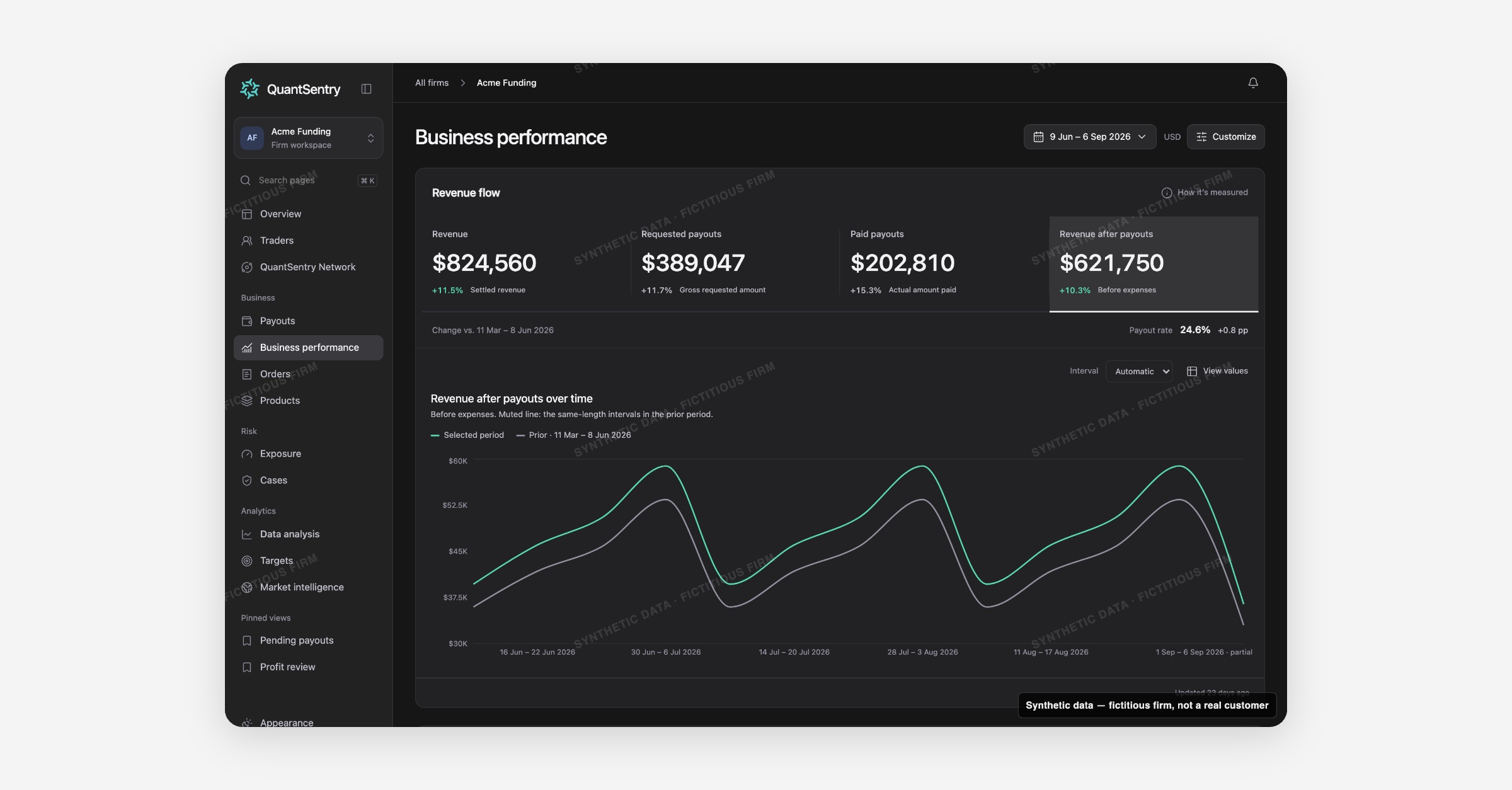
Business performance now shows settled revenue, requested and paid payouts, and revenue after payouts on one page, plus a Health Score that grades your pace against a benchmark, so you can see whether sales are turning into money you actually keep.
Screenshot uses synthetic example data from a fictional firm ("Acme Funding"). No real customer or trader data is shown.
What's new
Business performance (formerly called Firm) is now previewable in the QuantSentry prototype workspace.
The page opens on Revenue flow: four measure tiles, Revenue, Requested payouts, Paid payouts, and Revenue after payouts, each with its own trend chart and a comparison against the immediately preceding period of equal length.
Below it, an optional Health Score section scores signals such as average order value and payout rate against a reference benchmark, and a Product contribution table breaks revenue and payouts down by product.
The Health Score itself already runs on the same scoring engine now live in your QuantSentry workspace, so the numbers you preview here are not a mockup.
Why it matters
Owners and finance teams usually assemble this picture by hand: revenue from a commerce platform, payouts from a separate tool or spreadsheet, then a manual reconciliation.
That invites two common mistakes this dashboard is built to prevent: treating gross requested payouts (before a trader's profit split) as if they were money already paid out, and calling revenue minus payouts "profit" when it is still before operating expenses.
Business performance labels Revenue after payouts with the caption Before expenses everywhere it appears, and keeps requested and paid payouts as separate, clearly named measures.
For a prop firm business dashboard, that distinction is the difference between a real read on retained value and a number that only looks healthier than it is.
What you can do with it
Switch between Revenue, Requested payouts, Paid payouts, and Revenue after payouts tiles to trend each measure on its own chart
Compare any period against the prior period of equal length, with the payout rate change shown in percentage points
Check the Health Score for average order value and payout rate signals, scored against a reference benchmark, with a notice on how many signals could be scored
Sort the Product contribution table by revenue after payouts, revenue, or paid payouts to see which products carry the business
Customize the page to show or hide the Health Score and Product contribution sections
How it fits with the rest of QuantSentry
Business performance reads from the same revenue and payout figures as Overview, so the numbers reconcile wherever you look.
From here you can jump into Orders to see the settled orders behind the revenue figure, into Payouts to see the requests and payments behind each payout measure, or into Products to compare product-level economics in more depth.
A prop firm order book that separates verified revenue from refunds, discounts, and pending sales
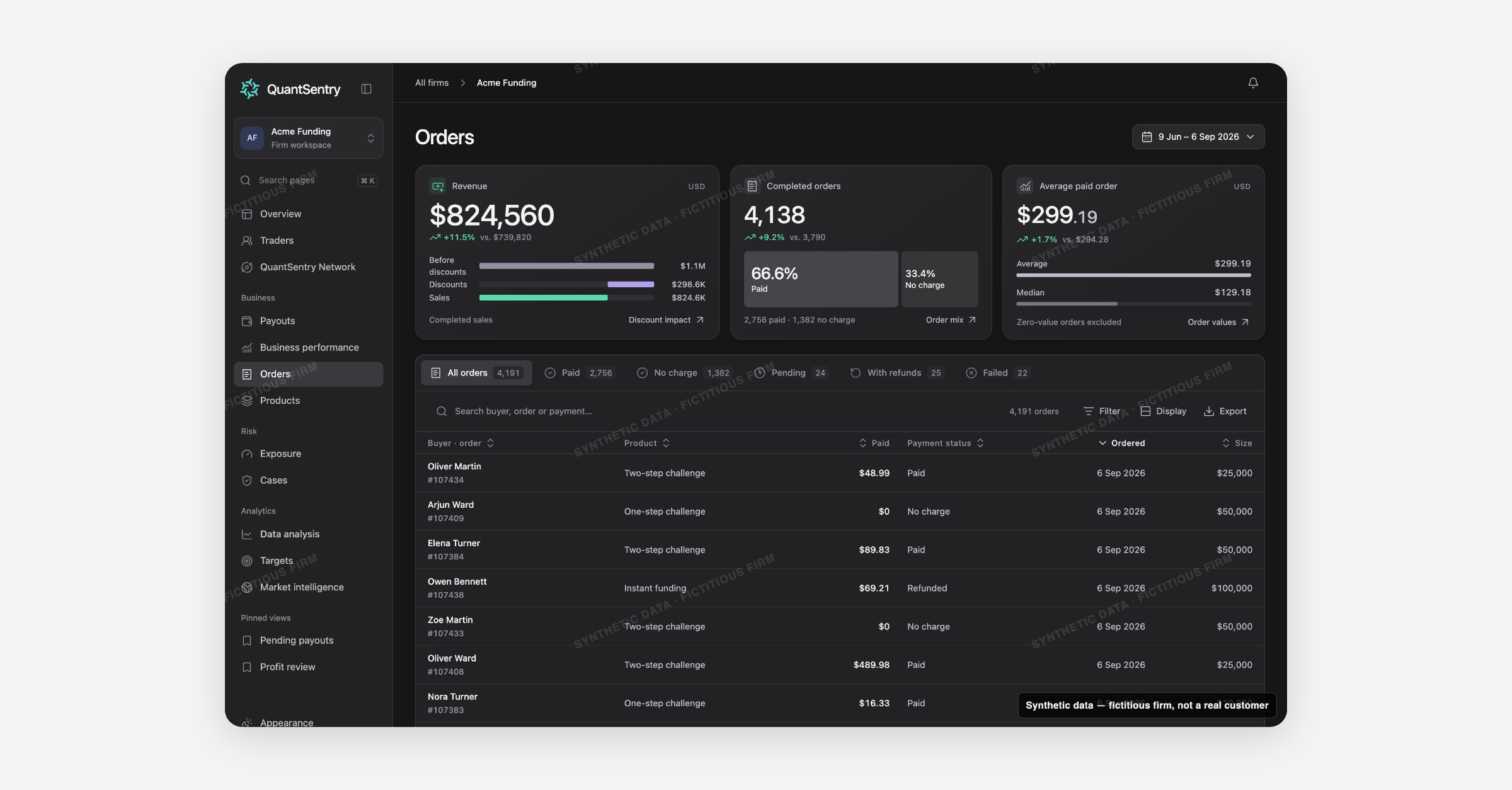
Orders now shows exactly which challenge purchases count as completed sales, splits out discounts and refunds, and links every order to the trader identity and trading account it created, all from one searchable order book.
Screenshot uses synthetic example data from a fictional firm ("Acme Funding"). No real customer or trader data is shown.
What's new
Orders is live in your QuantSentry workspace.
The order book lists every purchase recorded from your commerce source, paid, refunded, pending, or failed, and its KPI strip counts only completed orders (paid, partially refunded, or completed at no charge) toward Revenue, so pending and failed orders never inflate the sales number.
A discount bridge shows the before-discount total next to what was actually collected.
Status tabs, an 11-field filter builder, saved views, and a CSV export make the book searchable by buyer, product, account size, country, and more.
In the QuantSentry prototype, each order also opens into a full record, receipt, source events, payment reference, and the checkout identifiers recorded at signup, a detail view coming to your live workspace next.
Why it matters
A gross sales number that includes pending, failed, and fully refunded orders overstates what the firm actually sold, and reconciling that by hand across spreadsheets is slow and easy to get wrong.
Orders solves both problems at once: KPIs count only completed sales, and every order links straight to the trader identity and trading account it created.
In the QuantSentry prototype, the checkout identifiers recorded on each order (IP, device, card fingerprint, address, phone) are shown against other people who share them, labelled clearly as evidence to review, not a fraud verdict, a preview of what's coming to funded trader payout review workflows next.
That makes Orders a foundation for prop firm risk management well before an account ever reaches a Case.
What you can do with it
Filter the order book by Product, Account size, Country, Trader status, Paid with, and six other fields, combined with is-any-of, is-none-of, and date operators
See Completed order sales, Completed orders, and Average paid order for the selected period, each compared against the prior period
Save a filtered view (for example "UK funded buyers") and reload it later from Saved views
Export the filtered rows to CSV, with formula-injection protection built in
Preview, in the QuantSentry prototype, an order's full record and its Recorded at checkout identifiers, shown against other people who share them
How it fits with the rest of QuantSentry
Orders is the record behind the Revenue tile on Business performance and behind every product row on Products.
Buyer and account links open straight into Traders, so an order, a person, and a trading account are always one click apart.
Payout economics and challenge pass rates, broken down by product and account size
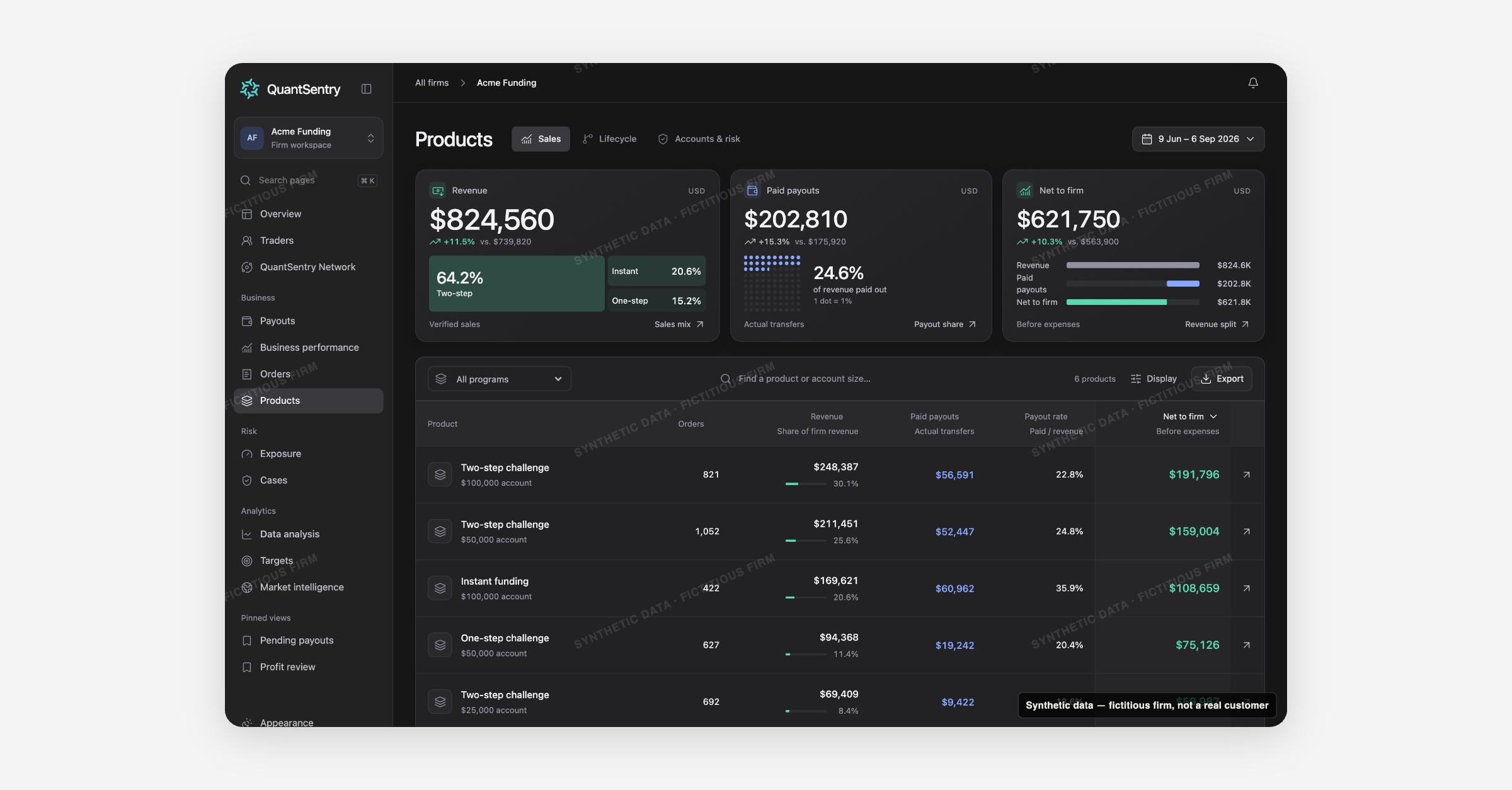
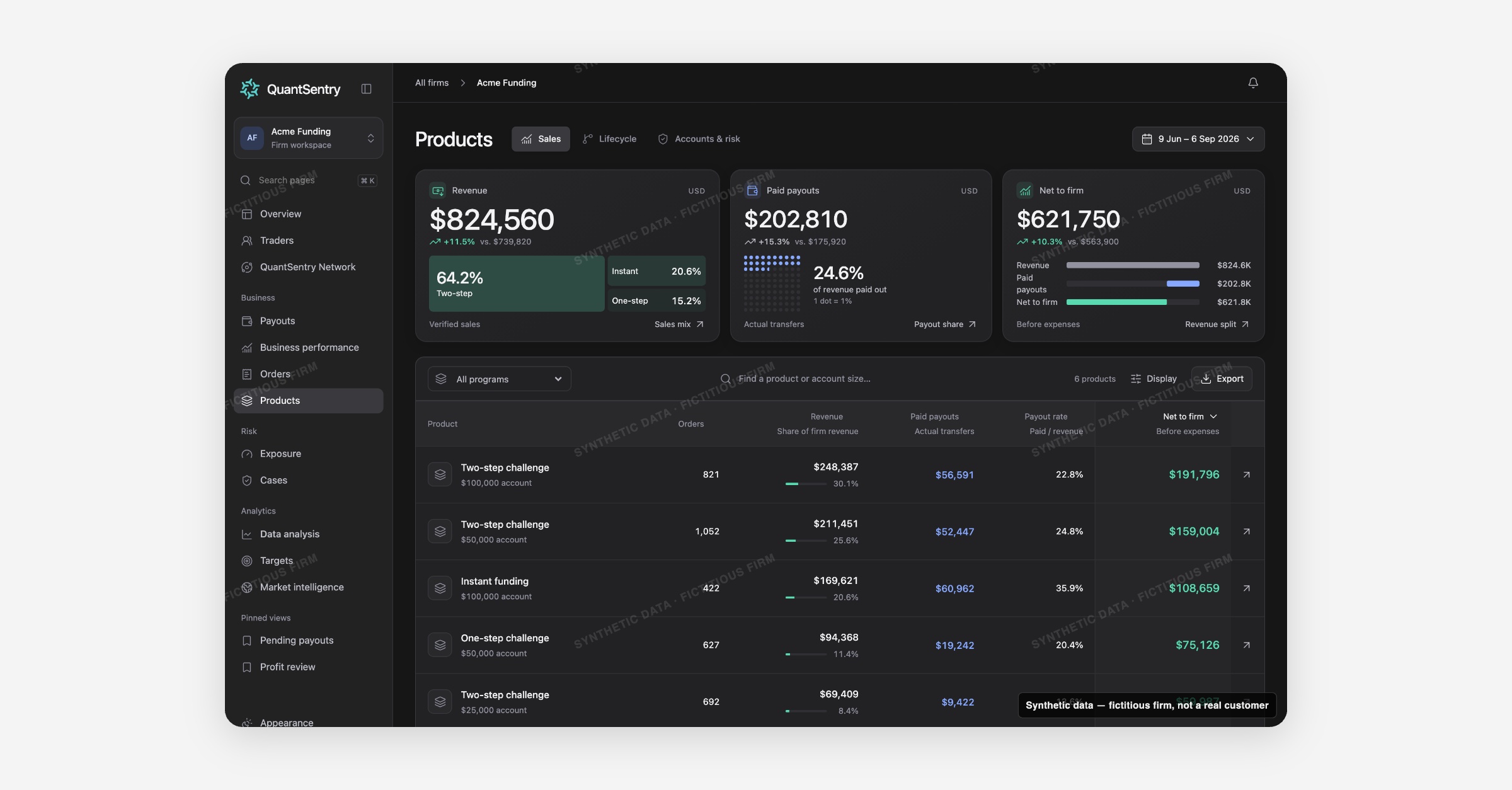
Products now shows which trading challenges and account sizes earn their place in the business: revenue, paid payouts, and net to firm per product, current funded liability and pending payouts, and a pass-rate funnel from evaluation to first payout.
Screenshot uses synthetic example data from a fictional firm ("Acme Funding"). No real customer or trader data is shown.
What's new
Products is live in your QuantSentry workspace, including the Sales view, the Accounts & risk view, and product detail pages.
The Sales view lists every product (for example a two-step $100,000 challenge) with its revenue, paid payouts, payout rate, and net to firm for the selected period, reconciled to the same totals used on Business performance.
Accounts & risk switches to today's position: funded accounts, known accrued liability, and pending payout requests per product, with a count of open Cases.
A product detail page adds four tabs, Economics, Accounts, Pending payouts, and Cases, for a single program.
A Lifecycle view, tracking a cohort of accounts from evaluation through to first paid payout, is previewable in the QuantSentry prototype, pending trading-platform data not yet connected in production.
Why it matters
A product can look strong on revenue and still pay out more than it sells, and that gap is easy to miss when sales figures live in the commerce platform, account stages live in the trading platform, and payout amounts live in a separate tool.
Products puts revenue, payout rate, and net to firm for every program side by side, so an owner can see at a glance which trading challenges and account sizes are actually profitable after payouts, not just which sell the most.
For risk and operations teams, the Accounts & risk view surfaces current exposure and open Cases per product, so review effort goes where funded liability is highest, and the Lifecycle preview turns raw pass and fail counts into an actual challenge pass rate by stage.
What you can do with it
Sort the Product economics table by Net to firm, revenue, paid payouts, or payout rate, and toggle Average order value on
Switch to Accounts & risk for today's Funded accounts, Known accrued liability, and Pending requested amount per product
Open a product's detail page to see its Economics, Accounts, Pending payouts, and Cases in one place
Preview, in the QuantSentry prototype, the Lifecycle funnel from evaluation to first payout, with median time and conversion rate at each stage
Export the product table to CSV for further analysis
How it fits with the rest of QuantSentry
Product rows reconcile to the same totals shown on Business performance's Product contribution table, and a product's pending payouts and Cases link straight into Payouts and Cases.
Orders link back here with View product, so a single sale, its program, and its payout economics are never more than a click apart.
Payout risk exposure, mapped by product and account size
Exposure now shows the funded payout liability owed across your whole trader book, grouped by product or account size, plus a profit-versus-liability scatter that flags accounts whose recent returns are unusually high relative to their starting balance.
Screenshot uses synthetic example data from a fictional firm ("Acme Funding"). No real customer or trader data is shown.
What's new
Exposure is live in your QuantSentry workspace.
The page rolls up every funded trader's accounts by person, not by account, so accrued liability, the amount that could be claimed if every funded trader requested their profit today, is never split across accounts that belong to the same person.
A Liability concentration panel groups that liability by product or account size, a profit-versus-liability scatter plots each account's period return against its liability with an adjustable review threshold, and a Traders by exposure table ranks people by accrued liability, highest return, or pending payout requests.
A few extras, a Review priority sort, Case references in the expanded trader row, and a shortcut back to the firm's payout cycle, remain previewable in the QuantSentry prototype for now.
Why it matters
Reasoning from platform balances account by account hides two things an owner or risk analyst actually needs: the firm's total funded obligation before any request arrives, and which accounts' recent profit is unusually high relative to their starting balance, a common signal of hedging, copy trading, or identity abuse.
Every liability figure on Exposure is labelled gross, before profit split and eligibility, and unmeasured accounts are counted separately rather than treated as zero.
That combination makes Exposure a working tool for prop firm risk management and payout fraud detection: concentration shows where review effort should go, and the review threshold turns a wall of account balances into a short list of accounts worth a second look.
What you can do with it
See Accrued liability, Pending requested, Linked to Cases, and Above review threshold for the current funded book, each one click from its filtered trader list
Group Liability concentration by Product or Account size to see where funded liability is concentrated
Adjust the Review at X% threshold (1% to 10%) and watch every card, filter, and chart recompute
Sort Traders by exposure by accrued liability, highest return, or pending requested, and search by trader or account
Expand a trader's row to see every funded account and pending payout request for that person
How it fits with the rest of QuantSentry
Exposure's header links straight to Payouts for pending requests, and a linked trader's Cases open in Cases.
Every row also opens the trader's full profile in Traders, so a concentration signal, the account behind it, and the person behind the account stay connected.