
QuantSentry changelog
A prop firm order book that separates verified revenue from refunds, discounts, and pending sales
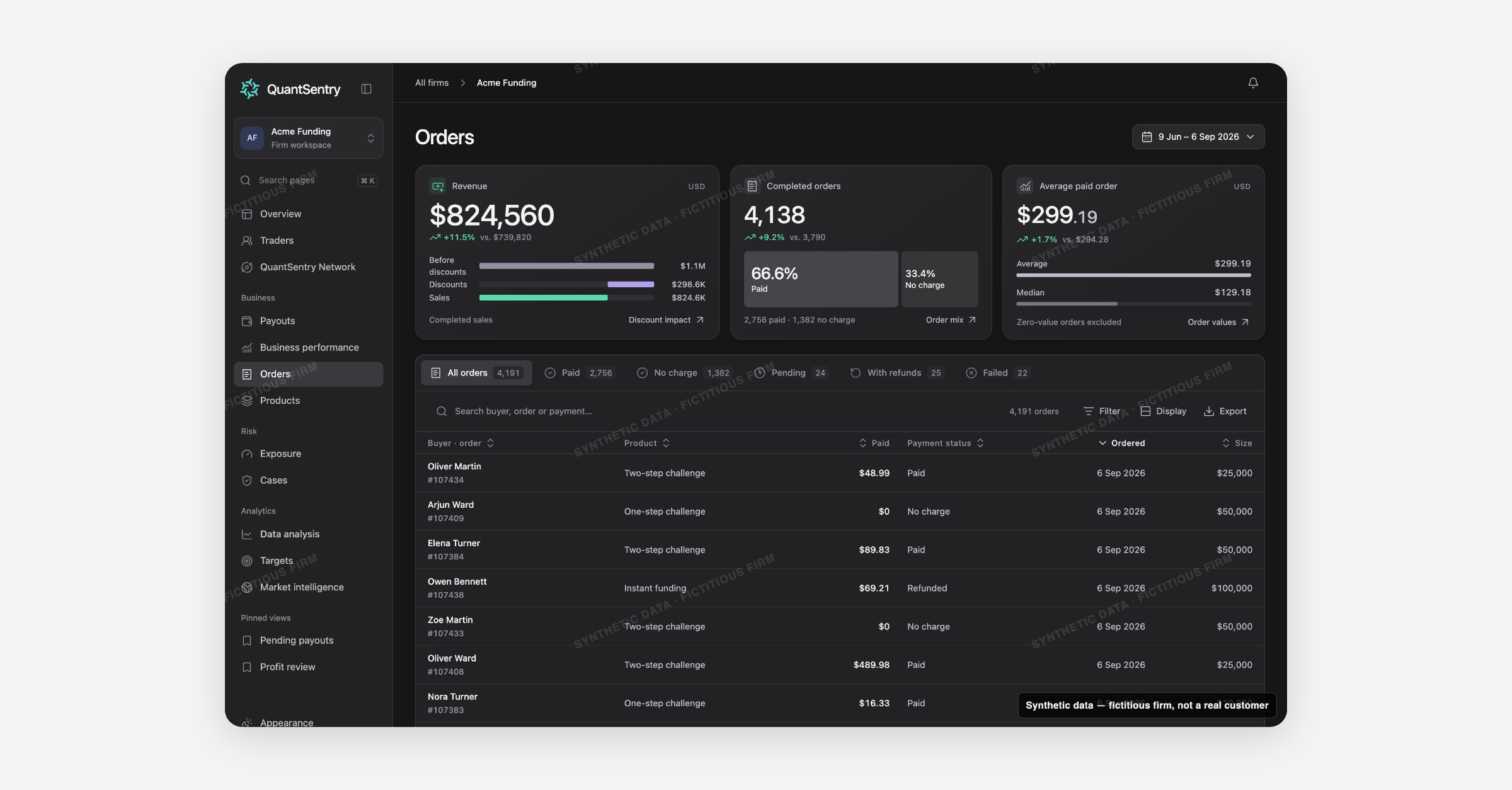
Orders now shows exactly which challenge purchases count as completed sales, splits out discounts and refunds, and links every order to the trader identity and trading account it created, all from one searchable order book.
Screenshot uses synthetic example data from a fictional firm ("Acme Funding"). No real customer or trader data is shown.
What's new
Orders is live in your QuantSentry workspace.
The order book lists every purchase recorded from your commerce source, paid, refunded, pending, or failed, and its KPI strip counts only completed orders (paid, partially refunded, or completed at no charge) toward Revenue, so pending and failed orders never inflate the sales number.
A discount bridge shows the before-discount total next to what was actually collected.
Status tabs, an 11-field filter builder, saved views, and a CSV export make the book searchable by buyer, product, account size, country, and more.
In the QuantSentry prototype, each order also opens into a full record, receipt, source events, payment reference, and the checkout identifiers recorded at signup, a detail view coming to your live workspace next.
Why it matters
A gross sales number that includes pending, failed, and fully refunded orders overstates what the firm actually sold, and reconciling that by hand across spreadsheets is slow and easy to get wrong.
Orders solves both problems at once: KPIs count only completed sales, and every order links straight to the trader identity and trading account it created.
In the QuantSentry prototype, the checkout identifiers recorded on each order (IP, device, card fingerprint, address, phone) are shown against other people who share them, labelled clearly as evidence to review, not a fraud verdict, a preview of what's coming to funded trader payout review workflows next.
That makes Orders a foundation for prop firm risk management well before an account ever reaches a Case.
What you can do with it
Filter the order book by Product, Account size, Country, Trader status, Paid with, and six other fields, combined with is-any-of, is-none-of, and date operators
See Completed order sales, Completed orders, and Average paid order for the selected period, each compared against the prior period
Save a filtered view (for example "UK funded buyers") and reload it later from Saved views
Export the filtered rows to CSV, with formula-injection protection built in
Preview, in the QuantSentry prototype, an order's full record and its Recorded at checkout identifiers, shown against other people who share them
How it fits with the rest of QuantSentry
Orders is the record behind the Revenue tile on Business performance and behind every product row on Products.
Buyer and account links open straight into Traders, so an order, a person, and a trading account are always one click apart.