
QuantSentry changelog
Payout economics and challenge pass rates, broken down by product and account size
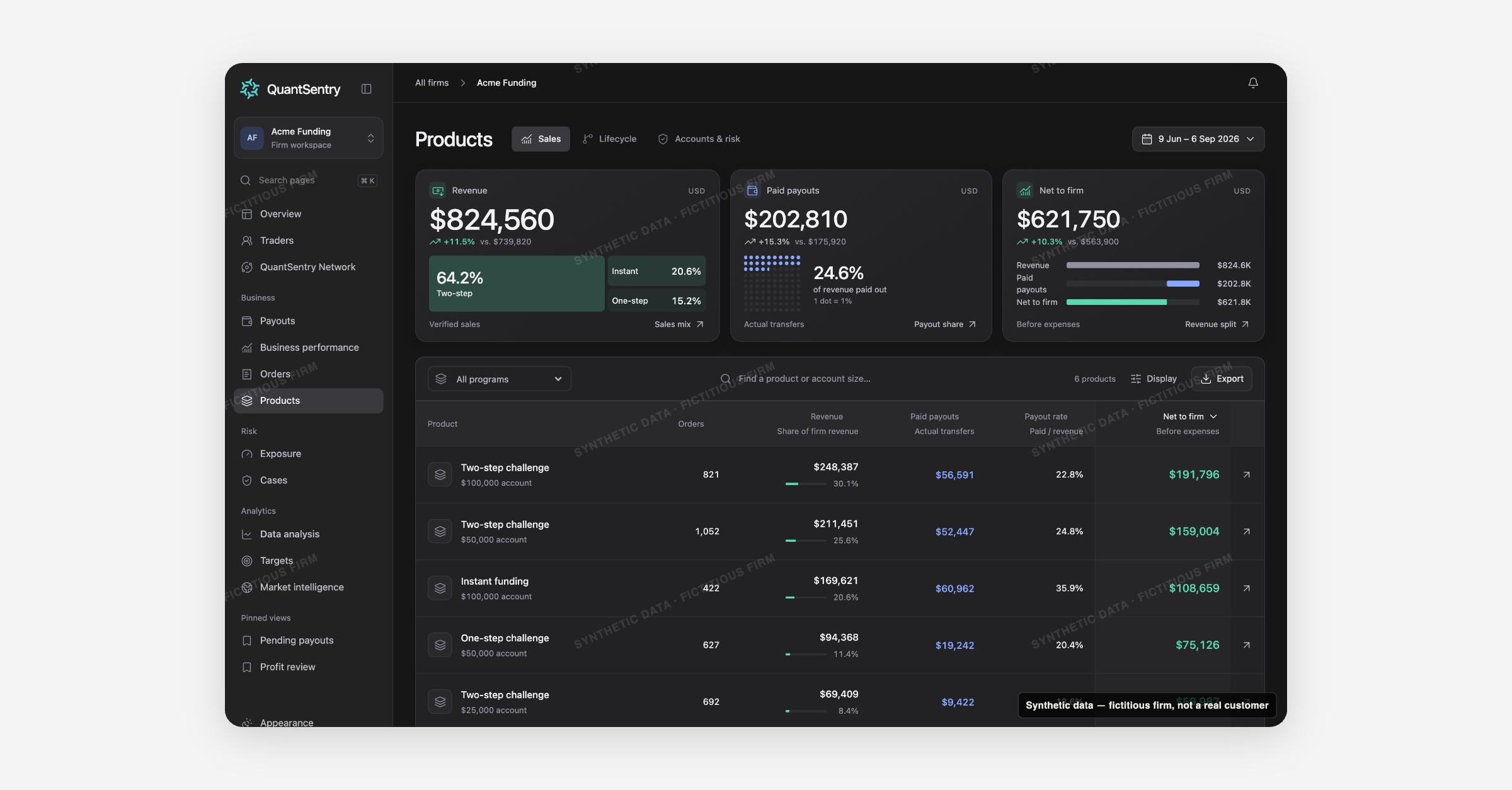
Products now shows which trading challenges and account sizes earn their place in the business: revenue, paid payouts, and net to firm per product, current funded liability and pending payouts, and a pass-rate funnel from evaluation to first payout.
Screenshot uses synthetic example data from a fictional firm ("Acme Funding"). No real customer or trader data is shown.
What's new
Products is live in your QuantSentry workspace, including the Sales view, the Accounts & risk view, and product detail pages.
The Sales view lists every product (for example a two-step $100,000 challenge) with its revenue, paid payouts, payout rate, and net to firm for the selected period, reconciled to the same totals used on Business performance.
Accounts & risk switches to today's position: funded accounts, known accrued liability, and pending payout requests per product, with a count of open Cases.
A product detail page adds four tabs, Economics, Accounts, Pending payouts, and Cases, for a single program.
A Lifecycle view, tracking a cohort of accounts from evaluation through to first paid payout, is previewable in the QuantSentry prototype, pending trading-platform data not yet connected in production.
Why it matters
A product can look strong on revenue and still pay out more than it sells, and that gap is easy to miss when sales figures live in the commerce platform, account stages live in the trading platform, and payout amounts live in a separate tool.
Products puts revenue, payout rate, and net to firm for every program side by side, so an owner can see at a glance which trading challenges and account sizes are actually profitable after payouts, not just which sell the most.
For risk and operations teams, the Accounts & risk view surfaces current exposure and open Cases per product, so review effort goes where funded liability is highest, and the Lifecycle preview turns raw pass and fail counts into an actual challenge pass rate by stage.
What you can do with it
Sort the Product economics table by Net to firm, revenue, paid payouts, or payout rate, and toggle Average order value on
Switch to Accounts & risk for today's Funded accounts, Known accrued liability, and Pending requested amount per product
Open a product's detail page to see its Economics, Accounts, Pending payouts, and Cases in one place
Preview, in the QuantSentry prototype, the Lifecycle funnel from evaluation to first payout, with median time and conversion rate at each stage
Export the product table to CSV for further analysis
How it fits with the rest of QuantSentry
Product rows reconcile to the same totals shown on Business performance's Product contribution table, and a product's pending payouts and Cases link straight into Payouts and Cases.
Orders link back here with View product, so a single sale, its program, and its payout economics are never more than a click apart.