
QuantSentry changelog
Funded trader payout review, from request to paid
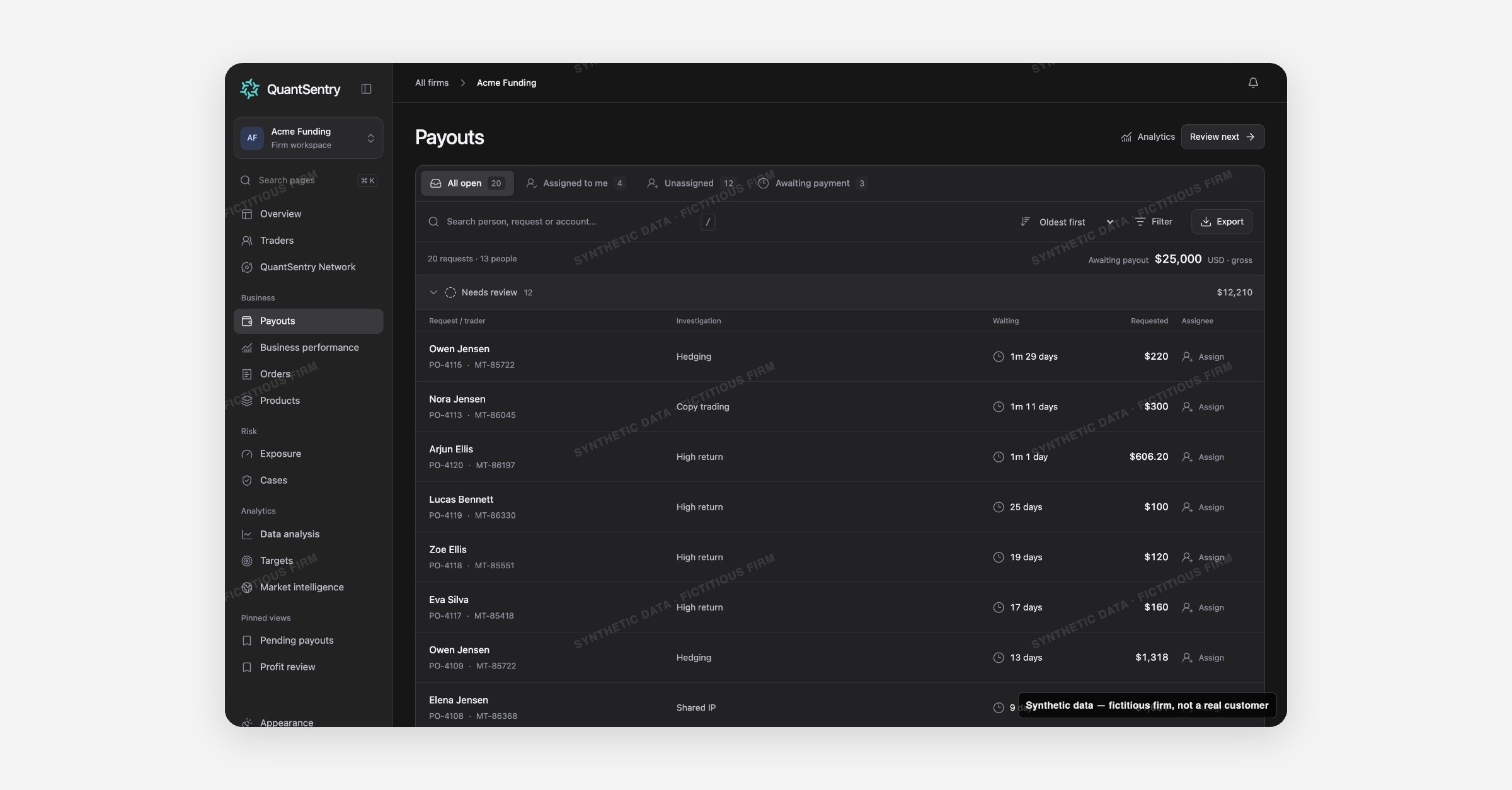
QuantSentry's Payouts page turns the payout back office into a review queue: every open request grouped by stage, with the trader's Cases and account signals attached, so reviewing a funded trader's payout request leaves a record instead of a spreadsheet.
Screenshot uses synthetic example data from a fictional firm ("Acme Funding"). No real customer or trader data is shown.
What's new
Payouts is now live in the QuantSentry workspace as a work queue, not just a report.
Every open (pending) request is grouped by review stage: Needs review, Investigating, Waiting for information, Awaiting payment, with the trader's name, request and account IDs, why it needs attention (an open Case, a review tag, a high-return account), how long it has waited, and who it is assigned to.
Opening a request shows the trader's Cases, account-level signals such as High return, and Trader DNA connections on one page, next to an append-only review activity log.
Why it matters
Without a queue, open payout requests sit in the trading platform's back office with no owner, no review trail, and no easy way to see which ones belong to a trader already under investigation.
Payouts is built for funded trader payout review: gross requested amounts are never substituted for actual transfers, profit split shows "Not supplied" rather than an assumed figure, and a review only records that a person looked at the request, it never pays, holds or declines anything.
Because the queue is not limited to a date window, the oldest unanswered request, often the one that matters most, never quietly drops off the list.
What you can do with it
Work the queue by stage, or filter to Assigned to me, Unassigned, or Awaiting payment.
Sort by Oldest first, Largest amount, or Trader name, and filter to requests Linked to a Case.
Use Review next to jump straight to the next request that still needs attention.
Check a request's linked Cases, High return account flags, and Trader DNA & connections before deciding what to do.
Move a review through Start review, add findings with Post note, and close it out with Complete review.
Switch to Payout analytics for requested-vs-paid history and a Needs investigation view of pending amounts tied to open Cases.
How it fits with the rest of QuantSentry
A payout request links to the trader's full profile in Traders, any open investigation in Cases, and rolls up into the Pending payouts and Accrued payout exposure panels on Overview.