
QuantSentry changelog
One source of truth for revenue and payouts across every trading platform you use
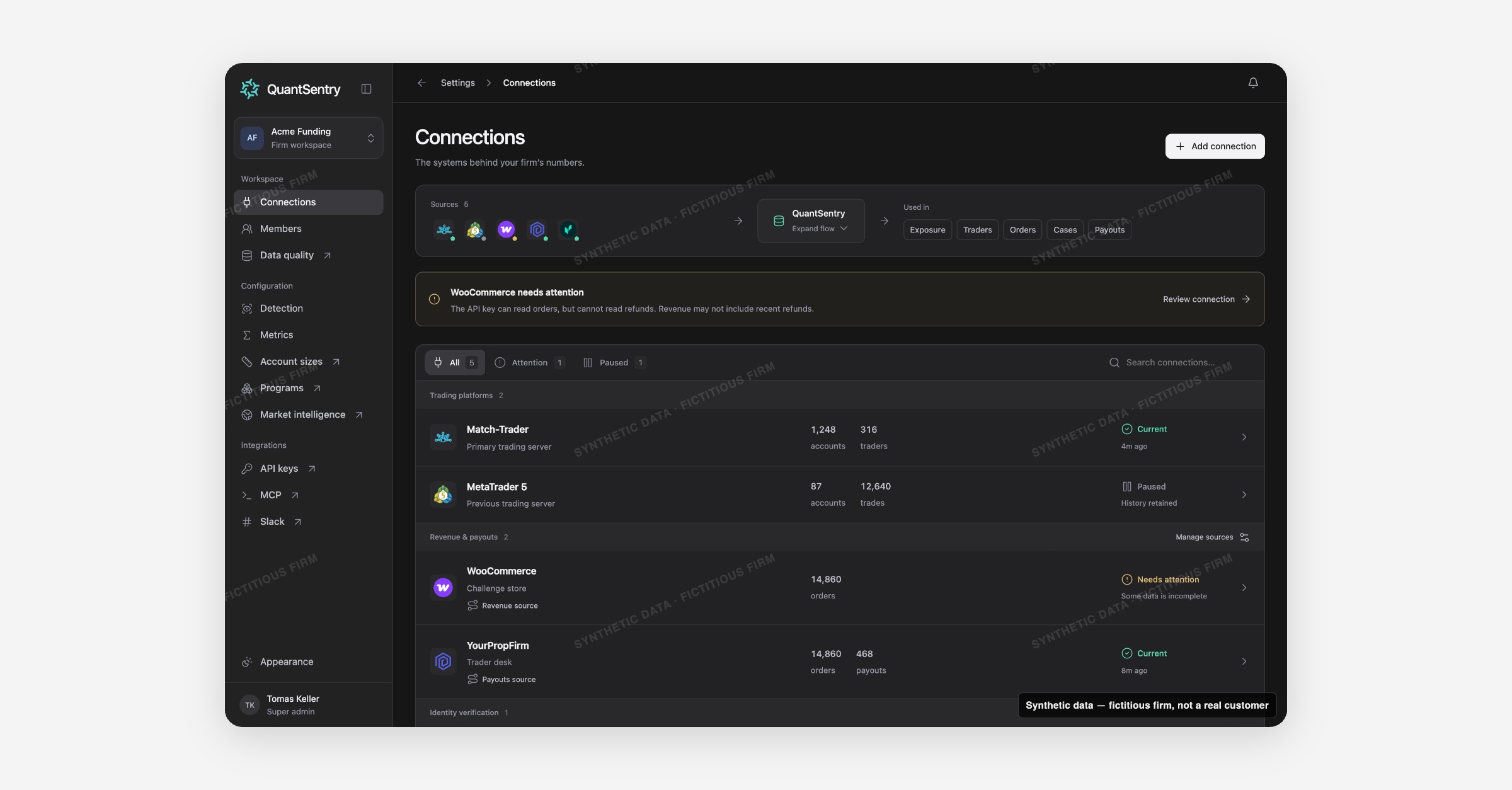
Connections is now previewable in the QuantSentry workspace: a single inventory of every trading platform, payment processor and payout source feeding your numbers, with one elected source per financial book so revenue is never double-counted.
Screenshot uses synthetic example data from a fictional firm ("Acme Funding"). No real customer or trader data is shown.
What's new
The Connections settings page lists every external system supplying a firm's data, grouped by category, with a health badge, record counts and last-sync age on each row.
A compact data-flow strip sits at the top: expand the central node to see sources, data types (Accounts, Trades, Traders, Orders, Payouts, Verifications) and destinations (Orders, Payouts, Traders, Cases, Exposure), and click any node to trace exactly where its data goes.
An attention banner surfaces any connection with an error or stale data before it quietly breaks a report.
Why it matters
Every revenue, payout and risk figure in QuantSentry depends on a data source, and firms often keep the same book in two systems, for example orders in both a store platform and a trader-desk platform.
Summing both double-counts revenue; picking one without a visible rule isn't auditable.
Connections makes that choice explicit: exactly one connection is elected to feed each financial book, and other stored copies stay available but excluded from reports.
What you can do with it
Add a connection from a catalog of 22 providers across five categories: trading platforms (MetaTrader, cTrader, DXtrade, Match-Trader and more), revenue and payouts (WooCommerce, YourPropFirm), identity verification (Veriff, Sumsub) and acquisition spend (Google Ads, Meta Ads, LinkedIn Ads).
Choose which connection feeds each financial book from Manage sources.
Check status at a glance through health badges (Current, Needs attention, Paused, Awaiting first sync) and view tabs for All, Attention and Paused.
Open a connection's detail page for stored counts, last successful read per resource, and full sync history.
Pause a connection without losing its history, or queue a retry sync when a credential needs updating.
Rely on read-only access: QuantSentry collects evidence and cannot move money or change trading positions.
How it fits with the rest of QuantSentry
Connections is the supply line for the rest of the workspace: it feeds Orders, Payouts, Traders, Cases and Exposure, and determines what evidence Detection has to work with.
Role grants from Members decide who can add, pause or configure a connection.